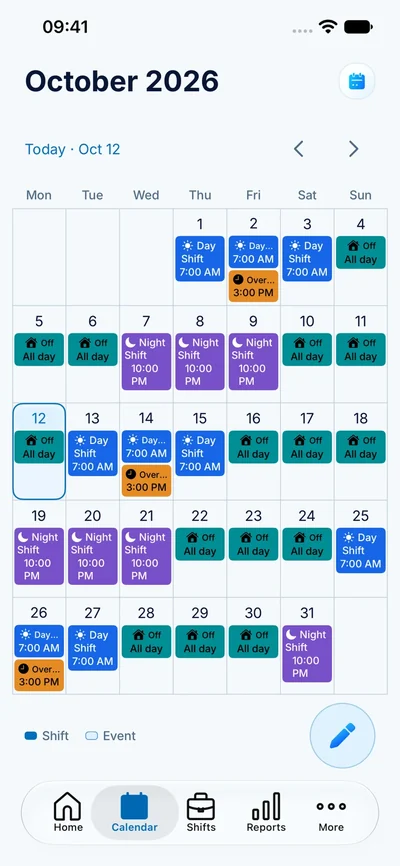
See the month before it happens
A normal Monday-to-Friday calendar is not much help when your workdays move every week. A personal shift calendar gives each kind of day a clear place: early starts, late finishes, overnight work and days off. Use the month view to spot the stretches when you are working and the gaps where you can make plans.
ClockPay combines this schedule with planned paid hours and estimated earnings. A future entry is a plan; when the real shift changes, update it so the calendar remains useful.
Build a calendar you can actually maintain
- Set up the shift types you use most often, including their start and finish times.
- Give each type a consistent color and a name you recognize.
- Add your confirmed shifts, then mark days off separately.
- Save repeated shifts as templates or apply a rotation.
- Check the next week whenever your employer publishes a revised roster.
For an overnight shift, keep its starting date clear. A shift beginning on Tuesday evening and ending on Wednesday morning is still one work period. See the overnight hours guide for a worked example.
Keep changes understandable
A single shift swap should not force you to rebuild your whole month. Start from the repeating plan, then adjust the individual shift that changed. Check the hours, shift type and any pay settings affected by the edit. Keeping a short note about a swap can help when you compare your plan with an employer record later.
Your ClockPay calendar is a personal planning record. It does not approve leave, assign other employees or replace the schedule issued by your workplace.